GA4 Audit Checklist: 30 Checks for Tracking, Attribution and Data Quality
Can we trust this data enough to make budget, product and growth decisions?
Most GA4 audits start in the wrong place.
Teams open the interface, scan a few reports, compare traffic with last month and then begin fixing whatever looks unusual. That may uncover obvious errors, but it rarely answers the question executives actually care about:
Can we trust this data enough to make budget, product and growth decisions?
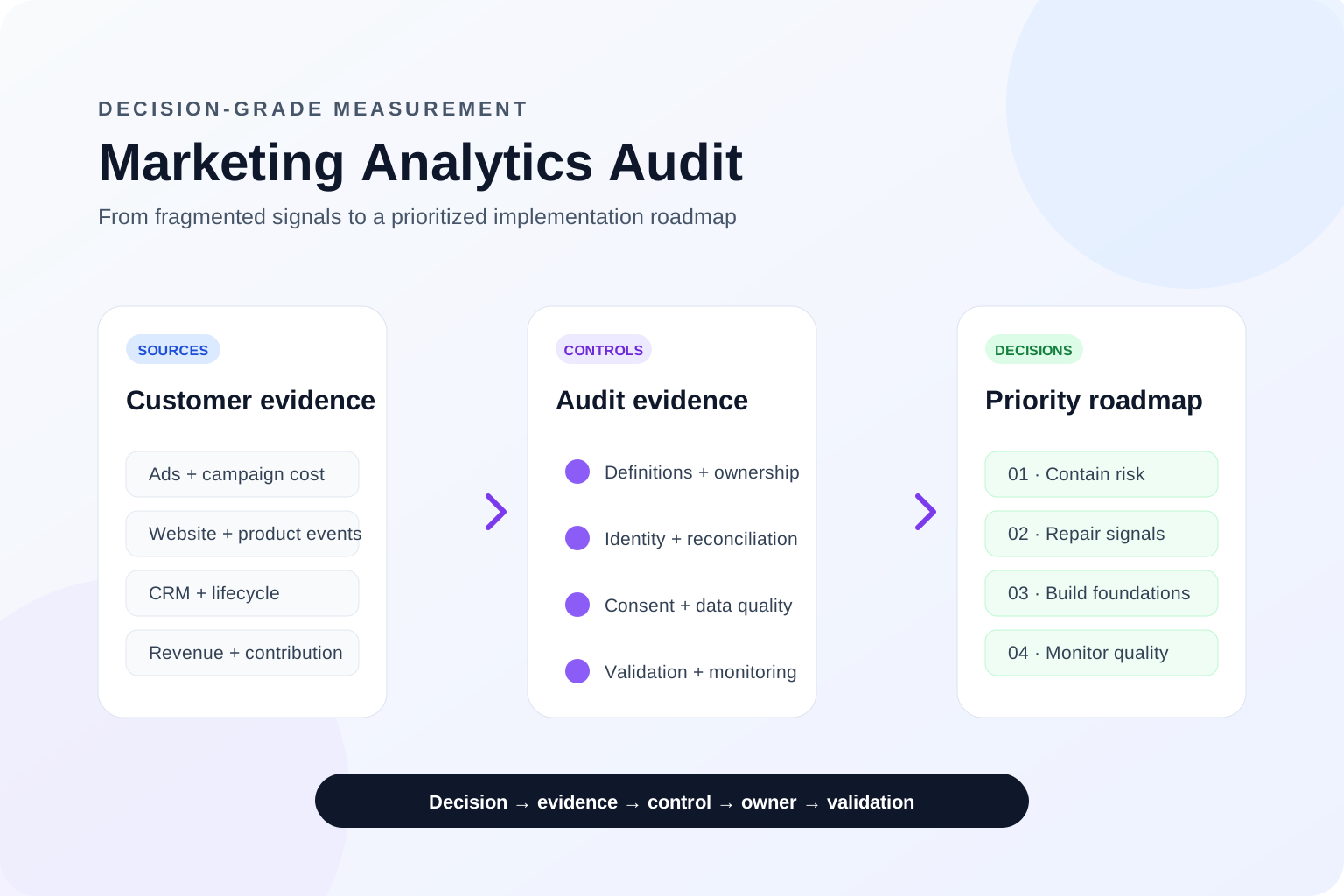
A useful GA4 audit is not a settings review. It is an evidence-based assessment of the measurement system behind the reports: what is collected, how it is attributed, where it is transformed, how it connects to advertising and CRM data, and whether the final numbers reconcile with business reality.
This GA4 audit checklist is designed for founders, marketing leaders, growth teams and analytics owners who need a practical way to identify tracking, attribution and data-quality problems without turning the process into an overly technical implementation exercise.
It explains what to check, why it matters, what evidence confirms a problem, and how to prioritise remediation based on business risk. It also provides a practical answer for teams asking how to audit GA4 tracking, run a GA4 data quality checklist, or understand why GA4 numbers do not match CRM and revenue systems.
Executive summary: what a good GA4 audit should prove
A decision-ready audit should give clear answers to five questions:
Is important user activity being collected once, at the correct moment and with the required parameters?
Can traffic and campaign performance be attributed without self-referrals, broken sessions or inconsistent UTM rules?
Do key events, purchases and revenue reconcile with advertising platforms, CRM records or billing systems?
Do consent, privacy and traffic filters behave as intended without silently removing useful data?
Can the team maintain the setup after the audit, or will the same problems return?
The output should not be a list of 70 equally important technical findings. It should separate critical business risks from low-impact housekeeping.
Table 1. GA4 audit risk map
GA4 audit risk map.
Swipe horizontally to view all columns →
GA4 audit risk map.
Risk level
Typical issue
Business impact
Action expectation
Critical
Duplicate purchases, missing revenue, broken lead events, PII sent to Analytics
Revenue, bidding or compliance decisions may be wrong
Access is least-privilege and privacy, cost and retention responsibilities have named owners.
Evidence to collect
IAM export, dataset settings, cost controls and owner register.
Measurement governance and release validation
High
How to verify
Review the measurement plan, change process, QA cases, monitoring, finding owners and post-release validation cadence.
Pass condition
Every critical signal has a definition, owner, acceptance test and recurring control after implementation.
Evidence to collect
Versioned plan, QA checklist, release record and monitoring owner.
Recommended GA4 audit workflow
01
01Business decision
→
02
02Expected measurement
→
03
03Evidence collection
→
04
04Reconciliation
→
05
05Risk rating
→
06
06Remediation
→
07
07Validation
Figure 1. Recommended GA4 audit workflow. A practical audit starts with the decision the data must support, then follows the evidence through collection, reporting and downstream systems.
1. Start with business decisions, not the GA4 interface
Before checking tags or reports, define which decisions depend on the data.
Typical decision questions include:
which campaigns generate qualified opportunities, activated users or revenue rather than surface-level conversions;
where onboarding, checkout or lead journeys lose users;
whether paid-media outcomes can be connected to CRM, billing or product data;
whether purchases, refunds, value and currency reconcile with the source-of-truth system.
This step prevents a common failure: technically accurate tracking that still cannot answer the questions the business needs to make.
Create a short measurement brief before the audit begins:
the decision;
the metric used to support it;
the event or data source behind the metric;
the expected source of truth;
the acceptable level of discrepancy;
the owner responsible for acting on the result.
A GA4 audit becomes much more valuable when every technical check can be linked to a commercial consequence.
2. Verify the property, data stream and collection layer
The first technical objective is simple: confirm that the correct property receives the correct data from the correct domains.
Check:
production and staging environments;
measurement IDs across templates and containers;
duplicate Google tags or GA4 configuration tags;
domains and subdomains that should be included;
enhanced measurement settings;
page-view behaviour for standard pages and single-page applications;
whether browser, server and Measurement Protocol events overlap;
whether obsolete tags remain active after migrations.
Use more than one validation method. GA4 Realtime and DebugView are useful for immediate checks, while browser developer tools and Tag Assistant help confirm what was actually sent. Standard reports may require additional processing time, so they should not be the only evidence used during implementation validation.
A strong audit records evidence for representative journeys rather than clicking randomly through the site. Test at least a tagged first visit, a lead or purchase journey, a cross-domain transition, and both consent-granted and consent-denied behaviour. Add mobile-specific journeys where the implementation differs.
What confirms a collection problem?
Examples include duplicate timestamps, page views sent by both automatic and custom logic, staging traffic entering production, consent defaults loading too late, inconsistent event names, or browser and server implementations forwarding the same outcome twice.
The business impact depends on the event. A duplicated scroll event is inconvenient. A duplicated purchase event can overstate revenue, inflate return on ad spend and train bidding systems on false outcomes.
3. Audit event taxonomy, key events and GA4 duplicate events
The event list should reflect the customer journey and the business model, not the structure of the website.
Diagnostic events — errors, consent state, implementation version or validation flags.
Then review each important event against a consistent contract.
Table 2. Event audit contract
Event audit contract.
Swipe horizontally to view all columns →
Event audit contract.
Check
Evidence to collect
Failure example
Why it matters
Trigger
Event fires at the intended user action
generate_lead fires on button click before successful form submission
Reported leads exceed real leads
Frequency
Event fires once per intended action
Purchase fires again on refresh
Revenue and conversion counts are inflated
Naming
Event uses one governed name
book_call, booked_call and schedule_call measure the same action
Reporting fragments and audiences become unreliable
Parameters
Required context is present
Lead event has no form type, market or lead ID
Teams cannot segment quality or reconcile with CRM
Value
Monetary value is meaningful and documented
Every lead is assigned an arbitrary value with no model
Bidding optimises toward a misleading signal
Identity
Event contains approved pseudonymous identifiers
CRM ID is missing or the same dummy ID is reused
Offline reconciliation and user journeys break
Environment
Event is sent only from approved environments
Test purchases enter production reports
Performance reports are contaminated
Key events deserve a stricter review because they are often used in executive dashboards, audiences and advertising optimisation.
For each key event, answer:
Does it represent a business outcome or merely an interaction?
Is it primary or secondary for optimisation?
Can it occur more than once per user or session?
Is its counting logic understood?
Does it have a value model?
Is the same outcome also tracked directly in Google Ads?
Can the event be reconciled to CRM, billing or backend records?
A long list of key events is not a sign of measurement maturity. It often means the business has not decided which outcomes should influence investment.
4. Find duplicate, missing and broken journey events
A GA4 tracking audit should validate complete journeys, not isolated tags.
Map one expected journey as a sequence:
Landing → Engagement → Form start → Form success → CRM lead → Qualified lead → Revenue
Then compare the expected sequence with actual data.
Look for impossible order, missing middle steps, abrupt post-release changes, browser-specific gaps, disappearing parameters, lost campaign identifiers and multiple events representing the same outcome.
A useful diagnostic is to compare ratios rather than raw volumes. For example:
form success ÷ form start;
purchase ÷ begin checkout;
CRM lead ÷ GA4 lead;
imported Google Ads conversion ÷ GA4 key event;
revenue in GA4 ÷ revenue in the billing platform.
Large discrepancies do not automatically mean GA4 is wrong. Timing, attribution, refunds, consent and timezone differences can create legitimate variation. The audit should explain the difference rather than force every system to show the same number.
5. Run a GA4 cross-domain tracking and referral audit
Cross-domain problems are especially damaging because reports may still look plausible.
When a user moves between different root domains, the implementation must preserve identity and session context. GA4 cross-domain measurement uses a linker parameter to pass identifiers between configured domains. If redirects, JavaScript navigation or form handling remove that parameter, the same person can be counted as a new user or session.
Validate:
all domains that belong to the same journey;
links and forms between those domains;
the presence and preservation of the linker parameter;
payment, booking and authentication providers;
unexpected self-referrals;
unwanted referrals from service providers;
source and medium before and after the transition.
Do not use the unwanted-referrals list as a substitute for correct cross-domain tracking. Excluding a referral can prevent a provider from becoming the visible source, but it does not automatically repair broken identity or session continuity.
6. Audit attribution, UTMs and Google Ads conversions
A GA4 attribution audit should separate three questions:
Was campaign information collected correctly?
Did GA4 classify the traffic as expected?
Did advertising and CRM systems receive the right conversion signal?
Start with UTM governance.
Review:
lowercase versus mixed-case values;
inconsistent source and medium conventions;
internal links containing UTMs;
email, affiliate and partner naming;
redirects that remove parameters;
manually tagged Google Ads URLs conflicting with auto-tagging;
campaign names that cannot be joined to cost or CRM data.
Internal UTMs should generally be avoided because they can overwrite the original acquisition context and create false campaign starts. Use event parameters or dedicated internal-navigation tracking instead.
the GA4 property and Google Ads account are linked;
auto-tagging is enabled where required;
selected GA4 key events are imported intentionally;
the conversion action is primary or secondary for the correct reason;
counting, attribution and conversion-window settings are understood;
duplicate native and imported conversion actions are not both used for bidding;
enhanced conversions or offline conversion workflows are configured only when the identity and consent model supports them.
Imported GA4 conversions and Google Ads-native conversions are not interchangeable in every situation. The right choice depends on the optimisation objective and source-of-truth model.
7. Reconcile ecommerce revenue, lead quality and CRM outcomes
The most commercially important section of the audit is reconciliation. This is where a GA4 ecommerce revenue mismatch or an unexplained gap between GA4, CRM and billing data becomes a business issue rather than a reporting curiosity.
GA4 should not be assessed in isolation. Compare it with the system that records the real business outcome.
For ecommerce, inspect:
transaction_id uniqueness;
purchase deduplication;
value and currency;
tax and shipping treatment;
item IDs, prices and quantities;
refunds and cancellations;
test orders;
timezone and settlement timing;
gross versus net revenue definitions.
For GA4 revenue metrics, currency must accompany monetary value, and a unique transaction ID helps prevent duplicate purchase measurement. The official GA4 ecommerce specification documents the purchase payload and transaction ID. These details are easy to overlook because the purchase event may still appear in reports even when revenue reporting is incomplete or misleading.
For lead-generation and B2B businesses, reconcile:
GA4 form success;
CRM lead creation;
duplicate or spam removal;
qualified-lead status;
opportunity creation;
closed-won revenue;
offline conversion uploads.
Table 3. Reconciliation framework
Reconciliation framework.
Swipe horizontally to view all columns →
Reconciliation framework.
Metric
GA4 evidence
Source-of-truth evidence
Acceptable explanation for variance
Red flag
Leads
Successful lead event with lead/form ID
CRM contact or lead record
Consent-denied users or delayed CRM sync
GA4 leads exceed CRM by a large, persistent margin
Purchases
purchase with transaction ID and value
Commerce or payment platform
Refund timing, tax or shipping definition
Duplicate transaction IDs or missing currency
Qualified leads
Imported or joined CRM stage
CRM lifecycle history
Qualification delay
Campaign optimisation uses raw leads only
Revenue
Purchase or offline revenue event
Billing, finance or CRM
Currency conversion or recognition timing
GA4 revenue drives budget decisions but cannot be reconciled
Google Ads conversions
Imported key event or native Ads action
Ads conversion action and backend outcome
Processing delay or attribution model
Two conversion actions represent the same outcome and both are primary
Chart 1. Illustrative audit findings by risk type
Important: This chart uses example data to demonstrate how an audit summary can be presented. It is not an industry benchmark.
Illustrative audit findings by risk type
Revenue accuracy6
Attribution5
Event collection4
Governance4
Privacy and consent3
Illustrative example based on a hypothetical audit. Not an industry benchmark.
An executive audit summary should group findings by business risk rather than by GA4 menu or GTM container.
8. Validate consent, internal traffic and privacy controls
Consent and privacy checks should be part of data-quality work, not a separate legal appendix.
For Consent Mode, verify that default consent states are set before measurement commands send data, and that consent is updated after the user makes a choice. Confirm behaviour for both granted and denied states, across page transitions and different regions where applicable. Use Google's Consent Mode implementation guide as the technical reference.
Check:
CMP and Google tag loading order;
default and updated consent states;
analytics_storage, ad_storage, ad_user_data and ad_personalization handling;
whether tags have built-in or custom consent checks;
whether denied-consent journeys are consistent with the approved implementation model.
For internal and developer traffic, use test states before activating permanent exclusions. Active data filters can permanently prevent excluded events from being processed, so they should not be treated as a reversible reporting preference. Google's data-filter documentation explains the permanent effect of an active exclude filter.
Privacy checks should also inspect URLs, page titles, form values, custom dimensions, search terms and campaign parameters for personally identifiable information. Email addresses, phone numbers and other direct identifiers must not be sent to Google Analytics. Hashing does not automatically make every data use appropriate; identity design should be reviewed against the platform terms, consent model and applicable law.
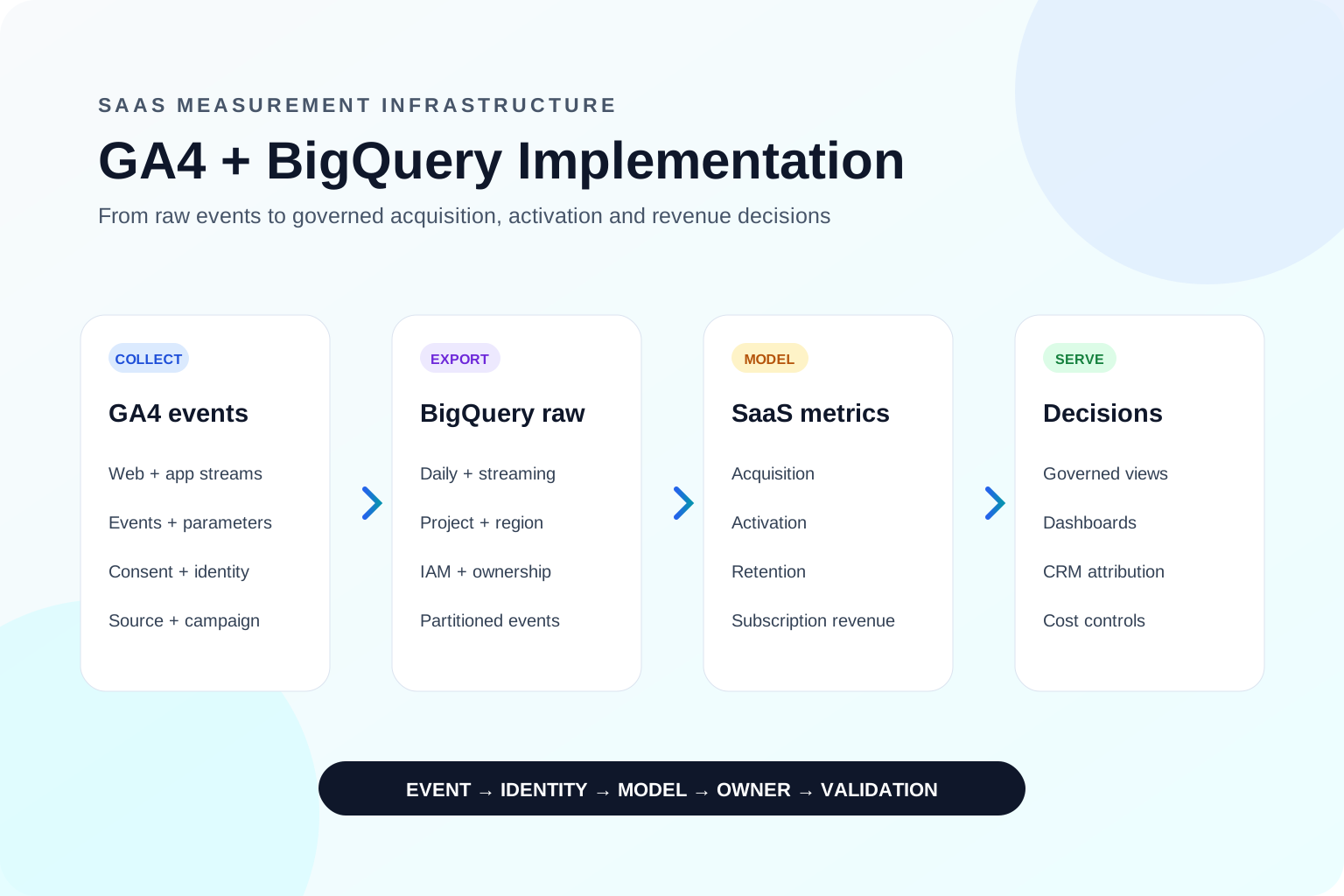
9. Review retention, GA4 BigQuery export validation and data ownership
GA4 interface reports are not the entire analytics system.
Review data-retention settings based on the analysis the business expects to perform. Standard GA4 properties provide limited user- and event-level retention options for explorations, while standard aggregated reports behave differently. Teams that expect long cohort analysis should understand those limits before discovering them months later.
The official GA4 BigQuery Export guide describes the raw-event export. For SQL-based analysis, reconciliation and joins with advertising, CRM, billing or product data, validate:
the correct property and Google Cloud project are linked;
daily export tables are arriving;
streaming export is enabled only when there is a real use case;
dataset region and access controls are documented;
event dates, timestamps and timezones are handled consistently;
consent and privacy rules extend to the warehouse;
expected events and parameters are present in exported rows;
costs, retention and ownership are assigned.
A successful export is not the same as a usable data model. Raw events still need governed definitions for users, sessions, leads, purchases, revenue and marketing cost. The related guide on GA4 vs Mixpanel vs Amplitude explains when a business may need product analytics or a warehouse alongside GA4.
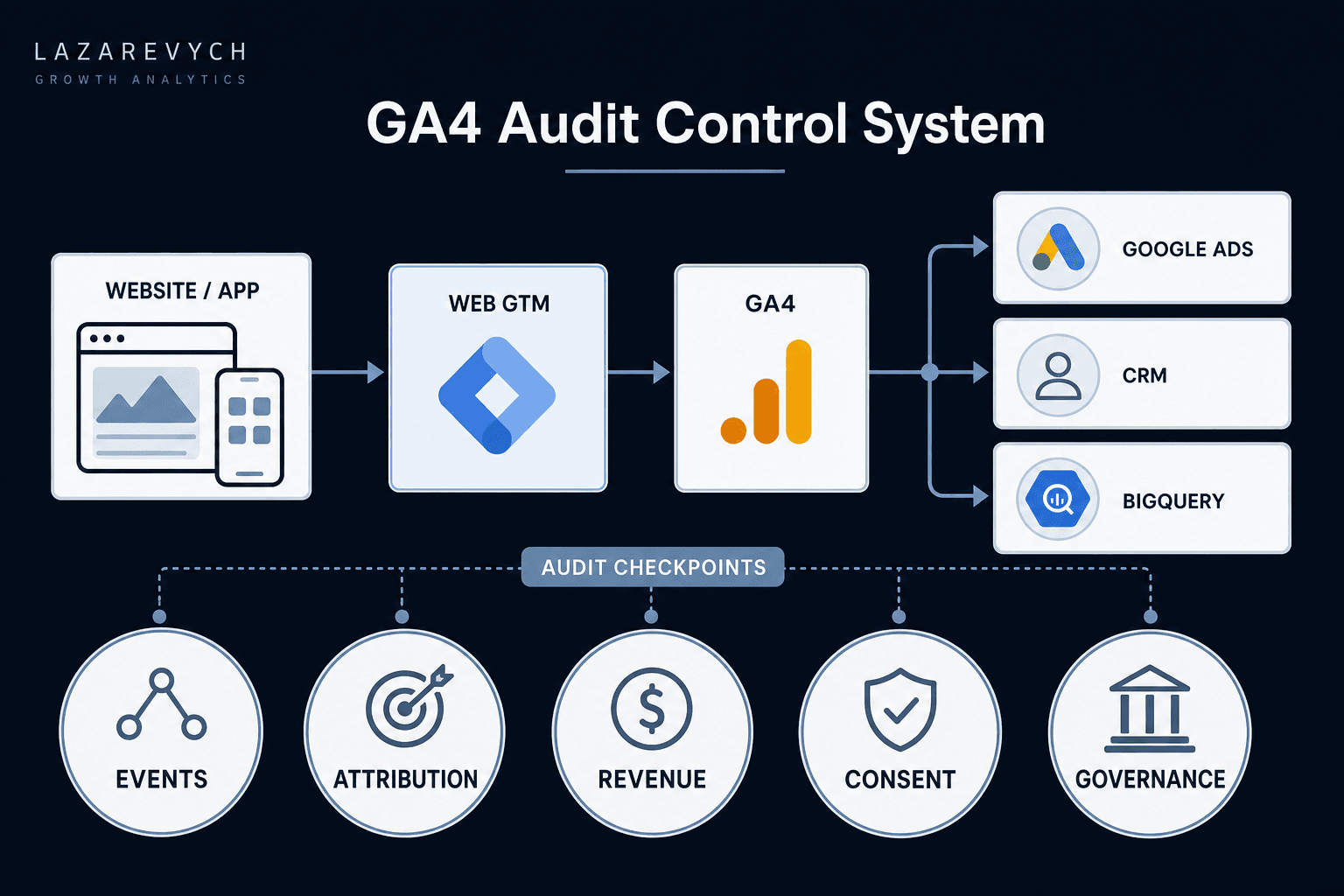
Decision-ready measurement architecture
01
01Website / App
02
02Web GTM
03
03GA4 and Server-Side GTM
04
04Google Ads / Meta
05
05CRM / Billing
06
06BigQuery
07
07BI and decision models
Cross-cutting layer
Identity, consent, taxonomy and governance
Figure 2. Decision-ready measurement architecture. GA4 is one component of a system that also needs consistent identity, outcome definitions and reconciliation across platforms.
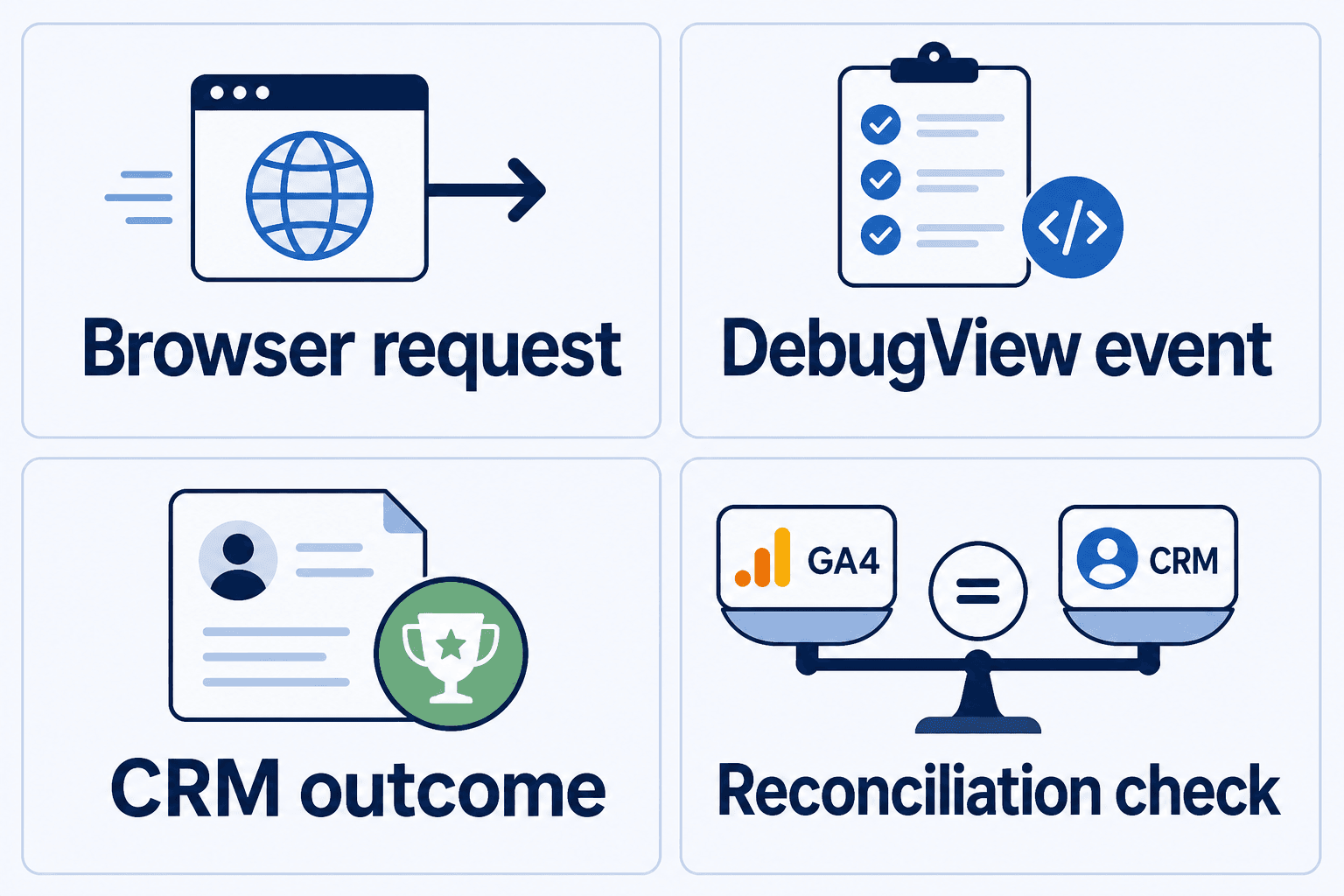
Audit evidence spans browser requests, Analytics validation, CRM outcomes and reconciliation — not a single report screen.
When the audit confirms that this layer is justified, the server-side GTM consulting scope explains the deliverables, cost drivers and acceptance evidence to require from an implementation owner.
10. Prioritise findings by business risk and effort
Do not send executives a spreadsheet with dozens of findings and no recommendation. For every issue, record the affected decision, evidence, direction of bias, risk level, owner, effort and validation method.
Use a two-step prioritisation model:
Step 1: Rate business risk
Critical: revenue, bidding, compliance or core lead measurement may be materially wrong.
High: acquisition or conversion decisions may be distorted.
Medium: analysis, segmentation or maintainability is limited.
Low: documentation or hygiene issue with little current decision impact.
Step 2: Rate remediation effort
Low effort: configuration or naming change with limited dependencies.
Medium effort: GTM, data-layer or cross-system change requiring coordinated testing.
High effort: identity, CRM, server-side or warehouse redesign.
Fixing five easy issues is not progress if one critical revenue problem remains open.
Business risk and remediation effort
Step 1: Rate business risk
Critical
Revenue, bidding, compliance or core lead measurement may be materially wrong.
High
Acquisition or conversion decisions may be distorted.
Medium
Analysis, segmentation or maintainability is limited.
Low
Documentation or hygiene issue with little current decision impact.
Step 2: Rate remediation effort
Low effort
Configuration or naming change with limited dependencies.
Medium effort
GTM, data-layer or cross-system change requiring coordinated testing.
High effort
Identity, CRM, server-side or warehouse redesign.
Prioritise by the decision that may be damaged, then by remediation effort. Fixing five easy issues is not progress if one critical revenue problem remains open.
A strong audit should identify control points that prevent several downstream errors. A governed successful-form event with a persistent lead ID can improve GA4 reporting, CRM reconciliation and offline conversion imports at the same time.
11. What can be fixed internally — and when to bring in specialist support
An internal team can usually handle the work when the setup is simple, ownership is clear, events are documented and discrepancies are explainable. Specialist support becomes more valuable when GA4 does not match CRM or revenue systems, paid-media bidding relies on uncertain conversions, tracking spans multiple domains, consent varies by region, purchases are duplicated, or the business needs offline conversions, BigQuery or server-side tracking.
The goal is not to make the stack more complicated. It is to reduce the number of decisions made with unverified data.
A GA4 Audit service can investigate your specific property, document evidence and rank the fixes when a self-audit cannot explain the discrepancies. For broader acquisition-to-revenue questions, the Growth Analytics Audit reviews the full measurement and commercial chain. If the problem is already known to be architectural, Analytics Infrastructure focuses on connecting acquisition, product, CRM and revenue data into a more reliable system.
12. A practical 30-day remediation plan
Table 4. From audit findings to an implementation roadmap
Clean test journeys and documented temporary controls
Week 1
Restore core measurement
Fix key-event triggers, values, currencies, cross-domain flow and campaign persistence
Realtime, DebugView, network and backend evidence agree
Week 2
Reconcile outcomes
Join GA4 leads or purchases to CRM, billing or ecommerce records; document variance
Reconciliation table with explained discrepancies
Week 3
Improve optimisation
Review Google Ads conversion actions, offline outcomes, audiences and primary/secondary status
Bidding uses intentional, validated outcomes
Week 4
Establish governance
Finalise taxonomy, owners, QA checklist, release process and monitoring
Versioned measurement plan and recurring validation process
The audit is complete only when the corrected journey is retested end to end.
Do not validate only inside GTM Preview. Confirm the event in the browser request, GA4 debug tools, the destination report, the advertising platform where relevant, and the backend system that records the real outcome.
Final approval: what a completed audit must prove
The 30 checks above create the working evidence. Before approving the measurement system, decision-makers should confirm five outcomes:
Core events and commercial outcomes are collected once and at the correct moment.
Acquisition context survives the customer journey and supports intentional advertising signals.
Leads, purchases and revenue reconcile with the appropriate source-of-truth systems.
Consent, privacy, access and retention controls behave as approved.
Every critical finding has an owner, correction plan, acceptance test and recurring control.
From GA4 reports to a reliable growth decision system
A GA4 audit should not end with a cleaner interface. It should produce a clearer relationship between customer behaviour, marketing investment and business outcomes.
The most valuable result is not “all tags fire.” It is confidence that:
acquisition reports reflect real campaign journeys;
conversions represent real outcomes;
revenue is reconciled rather than assumed;
advertising platforms optimise toward the right signals;
privacy and consent controls behave as intended;
the team can detect future problems before they affect a quarterly decision.
A buyer's guide to ecommerce funnel audit pricing, scope and deliverables—with a practical model for valuing conversion leaks before you hire a CRO consultant.