GA4 + CRM Revenue Attribution: How to Connect Marketing Spend to Real Revenue
A practical framework for connecting marketing spend, GA4 lead data and CRM lifecycle outcomes so budget decisions can be made against qualified pipeline and real revenue.
Most marketing teams can tell you how many leads a campaign generated. Far fewer can answer the question that actually changes budget: which campaigns generated qualified pipeline and closed-won revenue?
GA4 is useful for acquisition and on-site behaviour, but it usually does not know what happened after a lead entered the CRM. The CRM knows pipeline and revenue, but often loses the original marketing context. Revenue attribution works only when those two sides are deliberately connected.
The goal is not to force GA4 to become a CRM. The goal is to preserve enough acquisition identity that CRM outcomes can be joined back to the marketing source that created them.
The short answer: GA4 is not the final revenue source
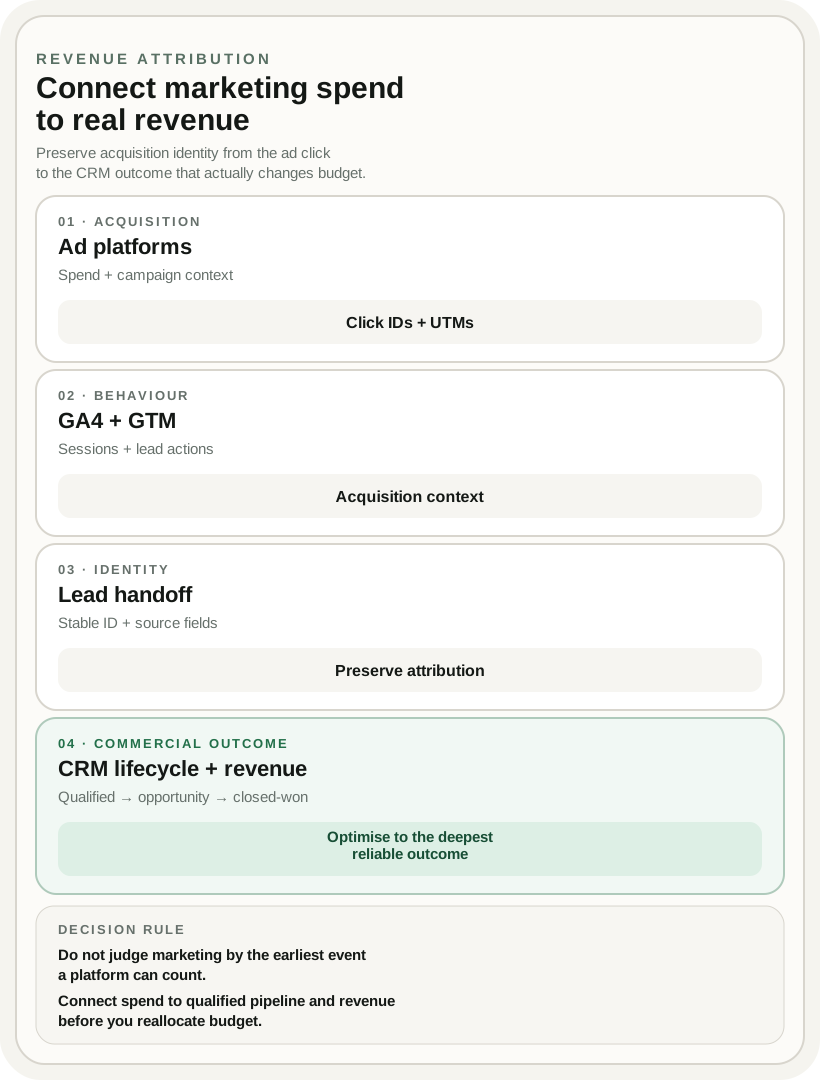
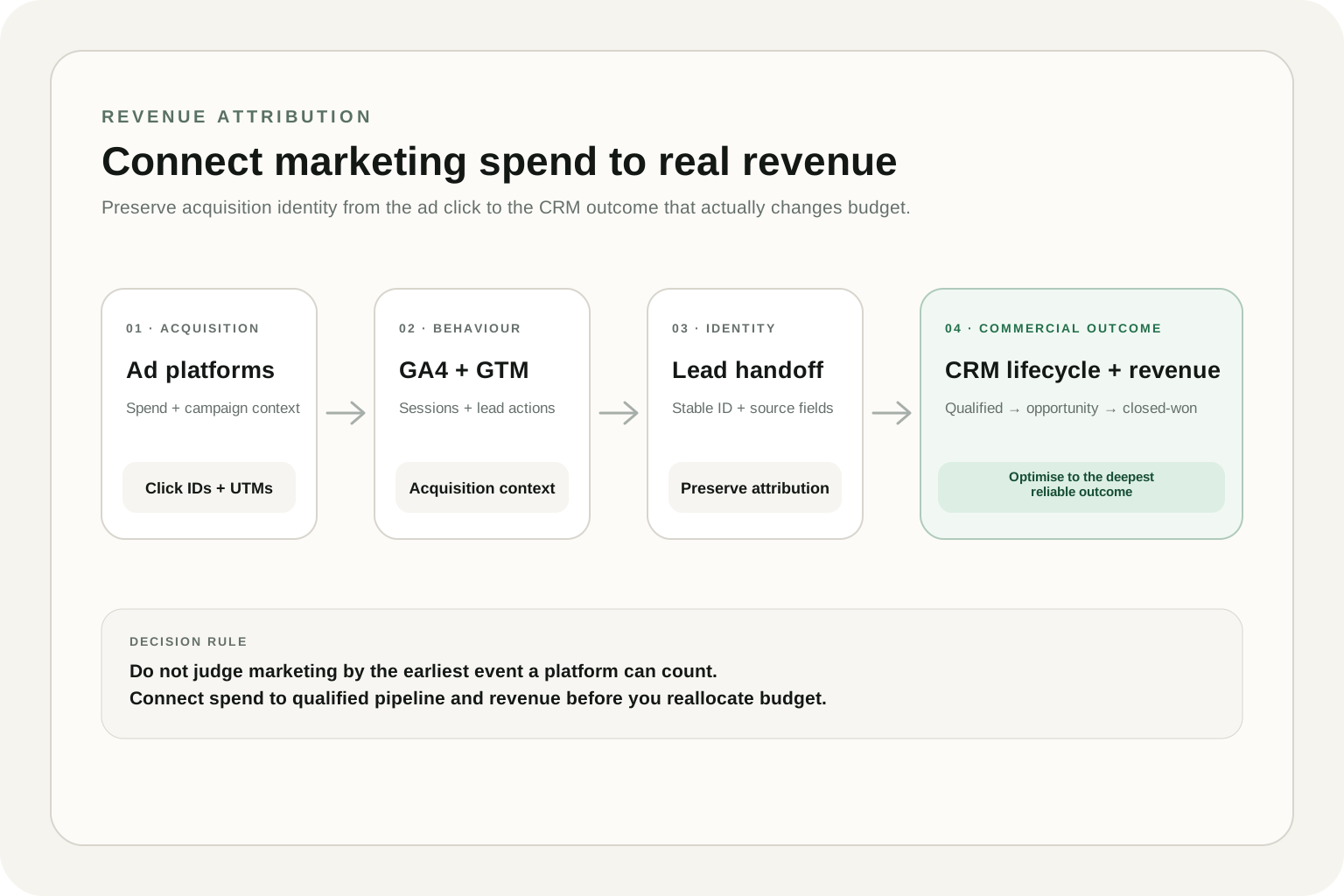
Use GA4 to understand acquisition, landing-page behaviour and lead actions. Use the CRM to own lifecycle stages, opportunities, closed-won status and revenue. Then connect the two with stable identifiers and preserved attribution fields.
01 · ACQUISITION
Ad spend + click IDs
Campaign, source, medium and platform identifiers
02 · BEHAVIOUR
GA4 + GTM
Sessions, key events and lead submission context
03 · IDENTITY
Lead handoff
Preserve attribution fields when the lead enters CRM
04 · REVENUE
CRM lifecycle
Qualified, opportunity, closed-won and realised revenue
Decision rule: optimise media against the deepest reliable business outcome you can consistently join back to acquisition data—not the earliest event a platform can count.
Why lead attribution breaks before revenue
The attribution chain often looks complete at the website layer and then breaks as soon as the lead enters sales operations. Common causes are simple: UTM values are not stored in CRM, click identifiers are discarded, duplicate contacts overwrite first-touch data, or the sales team creates opportunities without carrying source fields forward.
The result is a familiar reporting gap: paid media shows strong lead volume, GA4 shows healthy conversion rates, and the CRM shows revenue—but nobody can confidently connect the three.
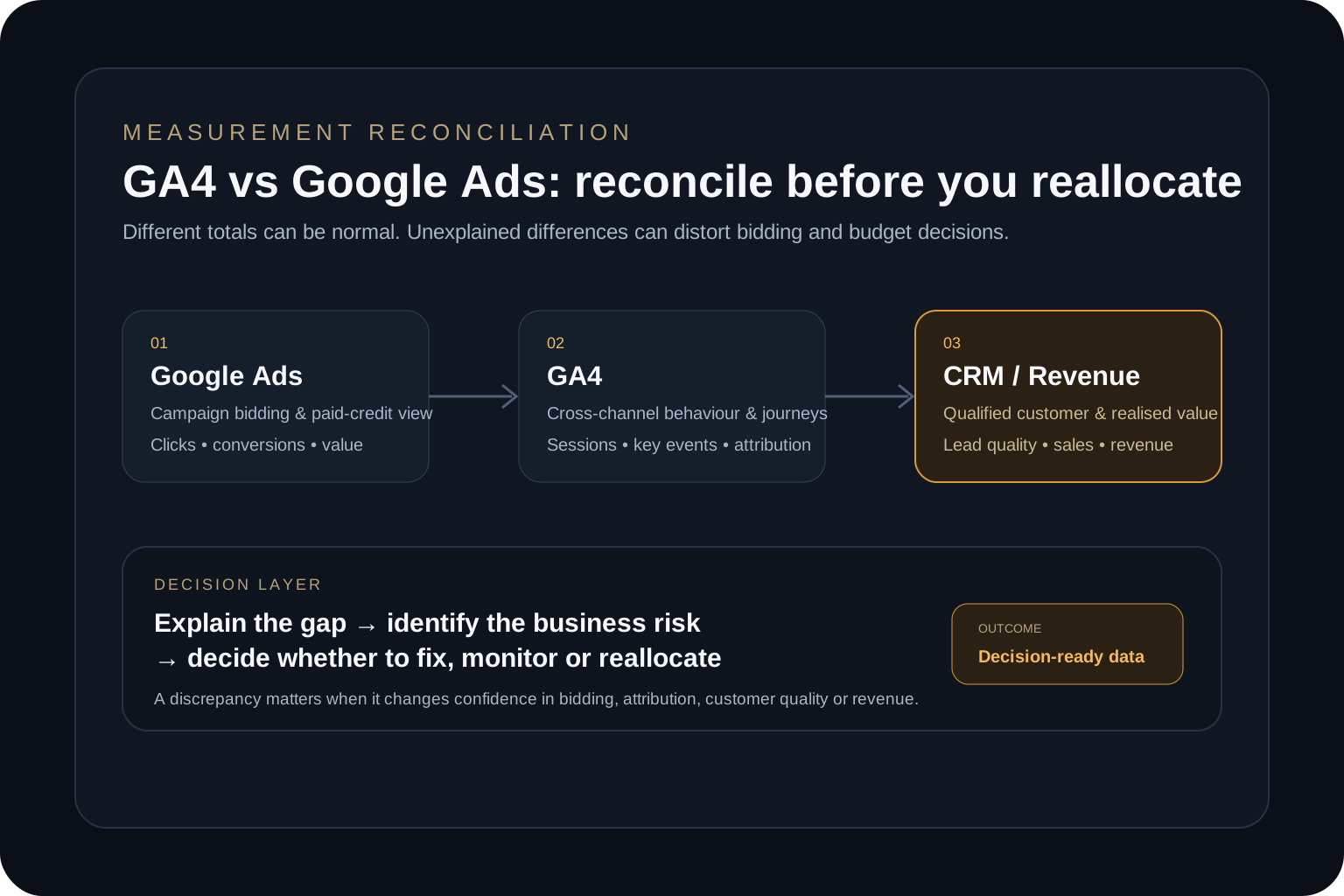
If you are already seeing conflicting conversion totals between systems, first use the diagnostic logic in the GA4 vs Google Ads conversion discrepancy guide before layering revenue attribution on top of unstable tracking.
The revenue attribution architecture
A practical setup has four layers. Each layer owns a different part of the truth, and the handoff between them matters more than any individual dashboard.
Table 1. The four layers of a revenue attribution system
Swipe horizontally to view all columns →
Table 1. The four layers of a revenue attribution system
Layer
Primary job
What must survive the handoff
Ad platforms
Spend, campaign delivery and click identifiers
Campaign context and platform click IDs where available
GA4 + GTM
Acquisition and on-site behaviour
Source, medium, campaign, landing page and lead event context
CRM
Lead, opportunity and sales lifecycle
Stable lead/contact ID plus preserved acquisition fields
Revenue layer
Closed-won value and decision-ready reporting
Deal value, status, dates and the ID needed to join back upstream
What to capture at the lead handoff
You do not need every browser event inside the CRM. You need the acquisition fields that let you reconstruct the commercial journey later.
At minimum, preserve a stable lead or contact identifier, source/medium/campaign context, landing page, timestamp, and any platform identifiers that are required for downstream conversion feedback. For businesses with long sales cycles, it is also useful to retain both first-touch and current/last meaningful touch fields instead of overwriting one with the other.
Which system should own each metric
Revenue attribution becomes easier when every metric has a clear system of record. Trying to make GA4, an ad platform and the CRM all report the same number usually creates more confusion, not less.
Table 2. Recommended source of truth by decision
Swipe horizontally to view all columns →
Table 2. Recommended source of truth by decision
Question
Primary source
Why
How much did we spend?
Ad platform / finance layer
Direct campaign cost record
What happened on the website?
GA4
Best view of sessions, acquisition and on-site actions
Was the lead qualified?
CRM
Qualification happens after the website event
Did the opportunity close?
CRM
Sales owns opportunity state
How much revenue did marketing create?
CRM + attribution join
Requires commercial outcome plus preserved acquisition context
How to join GA4 acquisition data to CRM outcomes
There are two useful joins. The first is a lead-level join: the website captures acquisition context when the form is submitted and passes it into the CRM with a stable lead ID. The second is a reporting join: CRM outcome data is combined with campaign cost and acquisition data in a reporting or warehouse layer.
For smaller setups, CRM fields plus a clean export may be enough. For larger teams, a warehouse or BI layer becomes valuable because it lets you reconcile spend, leads, opportunities and revenue without forcing one application to store everything.
This is the same broader principle behind a strong analytics infrastructure: each system keeps doing the job it is good at, while the measurement layer creates a reliable path between them.
When to send CRM outcomes back to ad platforms
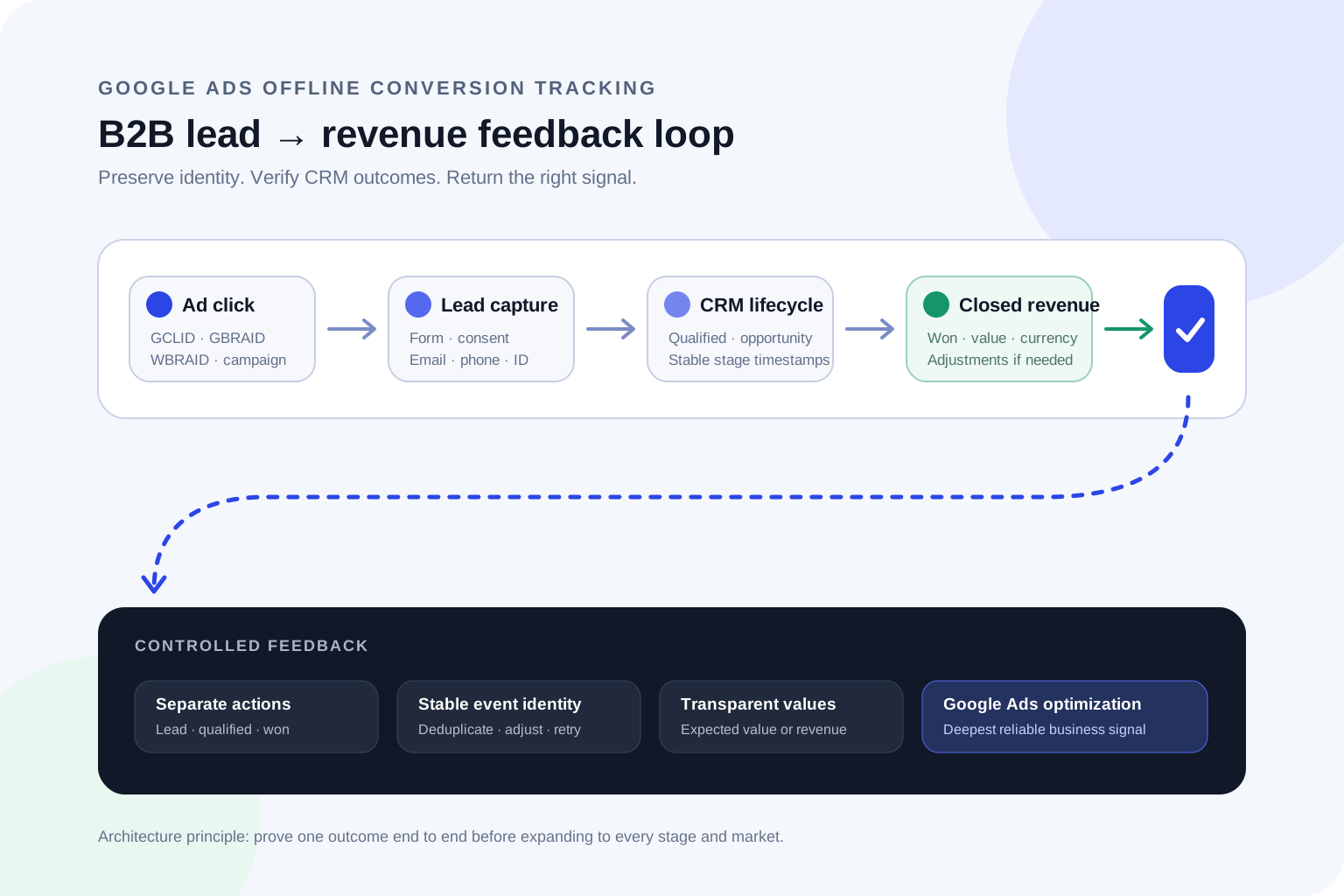
Once CRM stages are reliable, selected downstream outcomes can be sent back to advertising platforms as offline conversions. This can improve optimisation because bidding systems no longer have to treat every form submission as equally valuable.
A common progression is: lead submitted → qualified lead → sales opportunity → closed-won. You do not need to upload every stage as a primary optimisation signal. Choose the stage that balances business value, conversion volume and data latency.
For example, a closed-won conversion may be the strongest business signal but too sparse or delayed for efficient bidding. A qualified opportunity may provide a better operational compromise. The right design depends on sales cycle length and volume.
Worked example: the campaign that looked worse but made more money
Imagine two paid search campaigns over the same period. Campaign A generated more leads and looked better in a basic CPL report. Campaign B generated fewer leads and appeared less efficient at the website layer.
Table 3. Lead efficiency versus revenue efficiency
Swipe horizontally to view all columns →
Table 3. Lead efficiency versus revenue efficiency
Metric
Campaign A
Campaign B
Spend
$20,000
$20,000
Leads
200
120
Cost per lead
$100
$167
Qualified opportunities
20
30
Closed-won revenue
$60,000
$120,000
If you optimise only to lead volume, Campaign A wins. If you connect spend to CRM outcomes, Campaign B is clearly more valuable. That is why lead attribution and revenue attribution can produce different budget decisions.
Common failure modes
Most broken implementations are not caused by advanced attribution modelling. They fail at basic data continuity.
Table 4. Common revenue attribution failures and fixes
Swipe horizontally to view all columns →
Table 4. Common revenue attribution failures and fixes
Failure
Business impact
Fix
UTMs never reach CRM
Revenue becomes unattributed
Persist acquisition fields at lead creation
Source fields are overwritten
First-touch history disappears
Separate first-touch and current-touch fields
Duplicate contacts create multiple identities
Pipeline is fragmented across records
Define deduplication and lead-to-contact rules
Only lead events are sent back to ad platforms
Bidding optimises for volume, not quality
Introduce qualified downstream conversion signals
CRM stages are inconsistent
Revenue attribution looks precise but is unreliable
Fix lifecycle governance before advanced modelling
A minimum viable revenue attribution setup
You do not need a full data warehouse on day one. A useful MVP can be built around a clean acquisition handoff, disciplined CRM stages and one reporting view that reconciles spend with pipeline and revenue.
Start with one high-value conversion path. Make sure the same lead can be traced from campaign to GA4 event to CRM record to commercial outcome. Once that path is reliable, expand to more channels and more complex attribution logic.
Not usually. GA4 can receive additional events, but your CRM should remain the source of truth for sales stages and closed-won revenue. The important part is joining CRM outcomes back to acquisition context.
Should I import closed-won revenue into Google Ads?
It can be valuable when the data is reliable and the volume is sufficient. For long sales cycles, a qualified opportunity may be a more practical optimisation signal than closed-won alone.
Do I need BigQuery for GA4 and CRM attribution?
No. Smaller businesses can start with CRM fields and structured reporting. A warehouse becomes more useful as channel count, data volume, joining logic and reporting requirements grow.
What is the biggest mistake in revenue attribution?
Building a sophisticated dashboard before the lead identity and CRM lifecycle are stable. If the source fields or sales stages are unreliable, more modelling only makes the wrong answer look more precise.
Move from lead reporting to revenue-grade measurement
Map the full path from paid acquisition to CRM stages and closed-won revenue, then decide which business outcomes should feed reporting, forecasting and bidding.
A decision-first audit framework for diagnosing GA4 and Google Ads conversion discrepancies before they distort bidding, attribution and budget allocation.
A practical GA4 audit framework for finding tracking, attribution, revenue and data-quality problems — and prioritising the issues that can damage business decisions.